Claude Usage Tracker
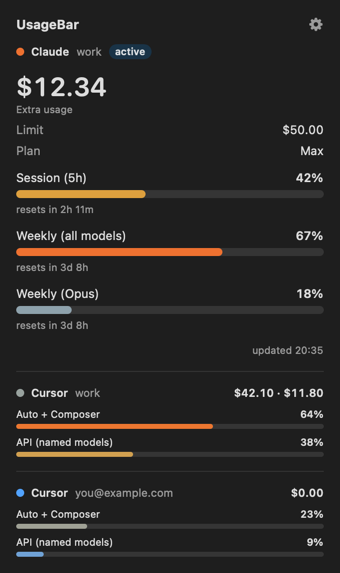
Track Claude usage limits free: an open-source menu bar app for Mac and Windows showing Claude Code session, weekly limits and Cursor spend.
What next?
Found it useful? Share Claude Usage Tracker
Free, no sign-up, works in the browser — send it to a friend or add it to your site.
Related tools
- Blood Alcohol CalculatorEstimate your blood alcohol content (BAC) from drinks, weight and time with this free online BAC calculator. See when you will be back to zero.
- Binary TranslatorTranslate text to binary and binary to text with this free online binary translator, and convert numbers between binary, decimal, hex and octal.
- CSS Gradient GeneratorCreate linear, radial and conic CSS gradients with a live preview, color stops, angle control and presets. Free online CSS gradient generator — copy the code.
- Diff CheckerCompare two texts online free and highlight every difference by line, word or character. Free online diff checker with ignore case and whitespace options.
- BMI CalculatorCalculate your BMI with this free online BMI calculator in kg/cm or lb/ft-in. See your WHO or Asian BMI category and the healthy weight range for your height.
- Alcohol Unit CalculatorCalculate UK alcohol units, US standard drinks and grams of alcohol with this free online alcohol unit calculator, and compare to the weekly guideline.
How to use Claude Usage Tracker
- 1Download UsageBar for macOS or Windows from the GitHub releases page
- 2Open it once; it reuses the Claude and Cursor logins already on your computer
- 3Watch your session %, weekly % and reset countdown in the menu bar or desktop strip
Frequently asked questions
How do I check my Claude usage?▾
Claude shows usage in Settings → Usage on claude.ai. UsageBar puts the same numbers — 5-hour session %, weekly % and the reset time — in your menu bar so you see them without opening a browser.
When does the Claude usage limit reset?▾
Claude Pro and Max use a rolling 5-hour session window plus a weekly limit. UsageBar shows a countdown to each reset, so you know exactly when you can continue.
Does it track Claude Code usage?▾
Yes. Claude Code shares the limits of your Claude plan, and UsageBar shows the session, weekly, Opus and Sonnet limits plus extra-usage spend.
Can it track Cursor usage too?▾
Yes. It shows Cursor on-demand spend for the current billing period, plus Auto + Composer and API plan usage, for every Cursor account on the machine.
Is the Claude usage tracker free and safe?▾
Yes. It is free and open source under the MIT license. There is no sign-up and no server of its own: it only talks to Anthropic's and Cursor's own APIs with the login already on your computer.
Which systems does it run on?▾
macOS 13 Ventura or later (native Swift app) and Windows 10 or 11 (a single PowerShell script). There is no Linux version yet.
Embed Claude Usage Tracker on your website▾
Paste this snippet into your page. The embedded tool runs in your visitor's browser and shows a small “Powered by clkr.work” link.